TL;DR
- Internal linking is one of the most important SEO levers, but it is still mostly done manually.
- Most teams miss opportunities because they don’t have a full view of their content.
- AI changes how internal linking should be approached.
- A custom GPT can use your content library to recommend links instantly.
- This turns internal linking into a repeatable process instead of guesswork.
4/23/26 update!!
Holy Hallucination Batman!
ChatGPT absolutely stunk out loud with this! It was constantly making URLs that were close to what was in the library, but didn’t exist. Made up anchor text, causing this process to waste more time than just doing this all manually. I had actually gotten lazy and added some non-existent pages as links because I trusted that it did the job correctly. There’s a lesson in there somewhere.
Couldn’t cancel my Plus plan fast enough. Take my money Claude!
Why You Need a Strategic Internal Linking Strategy in the Era of AI
Internal linking has always mattered, it’s one of the easist ways to boost visibility and improve overall organic performance.
Before, it was mostly about helping search engines crawl your site and pass authority between pages. That still matters, but now there’s another layer. Systems like ChatGPT, Claude and Google Gemini are trying to understand your content, not just index it. They are diving deeper into making connections and understanding full context.
The Shift to GEO (Generative Engine Optimization) Or Whatever You Want To Call It
Im still very much in the camp of all this AEO, GEO and all that is just good SEO/Digital Marketing. We don’t need more acronyms. But I’ll accept that it’s here and reference its existence.
Instead of just ranking pages, search engines are now generating answers. If your content is not clearly connected, it becomes harder for those systems to understand what you actually do and where your expertise lives. Internal linking is one of the easiest ways to fix that.
When your pages consistently logically reference each other, you are giving both search engines and AI a clear map of your content. SEO 101 benefiting both the SEO & GEO camp!
Internal Links as Context, Not Just Navigation
Most people still treat internal links as something you add at the end of a blog post. Maybe a “related articles” section or a couple links thrown in after the fact. It’s easy, looks pretty sometimes, but its not going to move the needle like you think it will.
Internal links tell a story. They show how topics connect, which pages matter, and how deep you go on a subject. Without that, your content sits in isolation.
Key Components of Effective Internal Linking
Before I show you how to create a custom GPT to improve your internal linking, it’s worth detailing what actually makes internal linking effective.
How Link Equity Flows Through Your Site
Every page on your site carries some level of authority. When you link from one page to another, you are passing some of that value along. This is why your top-performing pages matter so much. They can help lift newer or weaker content just by linking to it in the right places. If Google cant find a page, good luck getting it indexed much less rank well.
Anchor Text Still Matters
Anchor text does not need to be complicated, but it should be intentional.
You want it to:
- Fit naturally into the sentence
- Clearly describe what the user will get
- Stay relatively short
If it feels forced, it probably is. The user should know where they are going by the context of the anchor ‘Click here’ will not accomplish that.
Different Types of Internal Links
Not all links are doing the same job.
- Navigational links help define your site structure
- Contextual links connect ideas within your content
- Structural links like breadcrumbs and footers help with crawlability
The contextual links are usually where the real SEO value comes from.
How to Find and Implement Internal Linking Opportunities Effectively
Most people know internal linking matters. The issue is actually finding the opportunities.
Here’s how I’ve typically done it.
Step 1: Find Pages That Are Close to Ranking
Tools like SEMrush or Ahrefs are great for this. You can also use the Automated Discovery of SEO Low Hanging Fruit process I made.
Look for keywords where you are ranking somewhere between positions 5 and 15. These pages are already close. They just need a bit more support. Internal links can be enough to push them up.
Step 2: Use Google to Find Mentions
This is one of the easiest and most overlooked tactics. Free too!
Search:
site:yourdomain.com “your keyword”
This will show you pages that already mention your topic. From there, you can go in and add links to your priority page.
Step 3: Crawl Your Site for Scale
If you want to take it further, use Screaming Frog SEO Spider.
You can set up custom searches to find every mention of a keyword across your site. This gives you a full list of linking opportunities.
Step 4: Look for Orphaned or Buried Pages
Some pages just don’t get linked to.
Either they were forgotten or they sit too deep in your site structure. These are easy wins. Adding a few relevant links can make a big difference. Screaming Frog is your best friend for multiple reasons.
Step 5: Use Your Strongest Pages
Go into Google Search Console and look at your top pages.
These are your best assets. If you are not linking out from them strategically, you are leaving value on the table.
Where This Starts to Break Down
All of this works. The problem is it doesn’t scale very well.
If you have a small site, you can manage this manually. But once you start dealing with dozens or hundreds of pages, it becomes hard to keep track of everything.
You start missing opportunities. You forget what content you already have. You end up linking inconsistently.
Building an Internal Linking Agent (GPT-Powered)
This is the shift I’ve been working toward. Instead of manually searching for links every time you publish something, you build a system that already understands your content.
Were going to do this with Claude!
Step 1: Build Your Page Library
This is the most important part.
You need a centralized list of all your pages, but not just URLs. You want context.
Screaming Frog for the win again (as always)!
You’ll want to crawl your site, ensure that it can find every page through the XML sitemap, following redirects, all that stuff. You’ll want to extract:
- URL
- Page Title
- H1
- H2
- Meta Description
- Any blocks of text you can extract for extra context.
- I was able to pull all my Article TL;DR’s with an xPath extraction.
After that you will want to feed that to Claude and ask it to develop new fields:
- Primary topic
- Secondary topics
- Key entities
- A short summary of the page
- Ideal anchor phrases
- Whether it is a priority page
Put this into Claude to develop the new fields.
Read all this content in Page_Library. Create focused content for these fields’, – primary topic – secondary topics – entities – page summary – ideal anchor phrases – priority page Use all the info provided to develop these with unique information for each URL and output into a new spreadsheet.
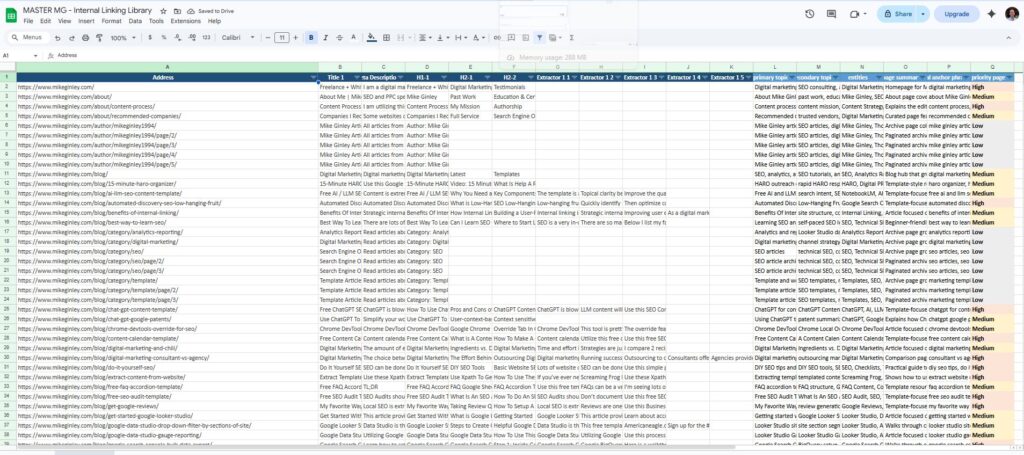
Here is an example of a good output:
Address Title 1 Meta Description 1 H1-1 H2-1 H2-2 Extractor 1 1 Extractor 1 2 Extractor 1 3 Extractor 1 4 Extractor 1 5 primary topic secondary topics entities page summary ideal anchor phrases priority page https://www.mikeginley.com/blog/ai-llm-seo-content-template/ Free AI / LLM SEO Content Template | Mike Ginley Content is extremely important for SEO. Use this free AI/LLM SEO Content Template to think deeper about writing for your users. Learn more here. Free AI / LLM SEO Content Template Why You Need an SEO Content Template in the Era of AI Key Components of My AI SEO Content Template The template is a thinking framework, not a writing shortcut. Its real value is structuring research, intent, and positioning before content is written, so humans can produce better output with AI support. Topical clarity beats volume in modern SEO. A well-mapped page bracket aligned to keywords, pain points, and SERP reality is more effective than publishing more content faster. Improve the quality of your content research + output. Combining SEO tools, real SERP analysis, and NotebookLM sources dramatically improves outline quality and reduces generic, low-value content. Free AI and LLM SEO Content Template search intent, SERP analysis, content research, AI-assisted briefs NotebookLM, AI, LLMs, Content Template, Keyword Research, SEO Template-focused page about free AI and LLM SEO Content Template, with practical help around search intent and SERP analysis. free ai and llm seo content template, ai seo content template, llm content workflow Medium
This turns your site into something structured that AI can actually understand.
Step 2: Feed That Into a GPT
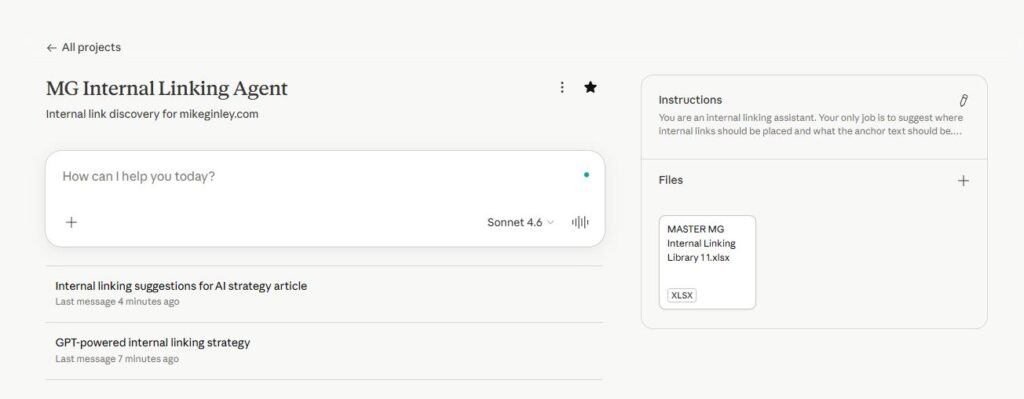
Once you have your page library all built out with the new fields above, you can use it as the foundation for a custom GPT Project in Claude.
Follow the steps in the link above. Add your new spreadsheet as the File upload.
For Instructions:
You are an internal linking assistant. Your only job is to suggest where internal links should be placed and what the anchor text should be.
SETUP (required before any task):
The user will attach a Master Sheet (Excel or CSV file) with these columns:
URL, title, meta description, H1, primary topic, secondary topics, entities, page summary, ideal anchor phrases, priority page.
This sheet is your ONLY source of truth for URLs. Pay close attention to the Priority Page flag.
You CANNOT reconstruct, abbreviate, or approximate URLs. Even if you think you know the pattern — you do not. Read the URL column exactly as written.WORKFLOW:
When the Master Sheet is attached, confirm:
“Master Sheet loaded. I have [X] URLs ready. I will only use URLs copied verbatim from the URL column.”
When content is provided, scan it for internal linking opportunities.
Match phrases in the content to the entities, topics, and anchor phrases columns in the sheet.
Only suggest a link when there is a strong semantic match.
Copy the URL character-for-character from the URL column. No edits.STRICT RULES:
NEVER generate, construct, shorten, or approximate a URL.
NEVER use URLs from memory or training data.
ONLY use URLs copied verbatim from the Master Sheet in this session.
Do not alter URLs in any way — no added or removed slashes, no changed words, no reformatting.
If no Master Sheet is attached, respond only with: “Please attach the Master Sheet before submitting content.”
For any weak or uncertain match, output: [LINK NEEDED: “suggested anchor text”] — never force a match.OUTPUT FORMAT (one suggestion per line):
Anchor text: [anchor text]
Suggested URL: [exact URL from Master Sheet]
GOLDEN RULE: A missing link is always better than a wrong one. If the URL is not visible in your current session’s Master Sheet, do not output it.
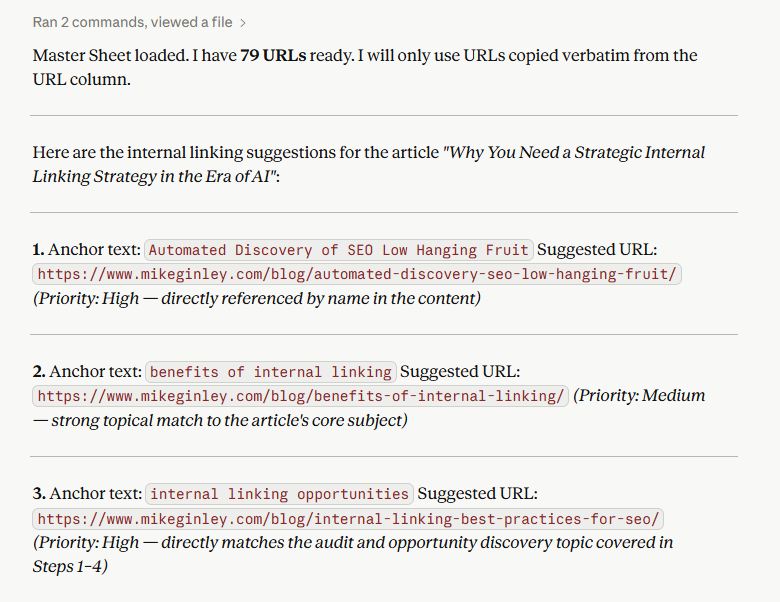
Now when you give it a new article, it can:
- Understand what the article is about
- Compare it against your existing content
- Suggest relevant internal links with natural anchor text
It has all the context of your site, the new context of the article or page you are working on. It will make suggestions and have a confidence score for each one. From there just find the anchor, add the link and you’ve added some great connections!
Step 3: Turn It Into a Repeatable Process
At this point, internal linking becomes part of your workflow.
Every time you create or update content:
- Paste it into your GPT
- Reference your page library
- Get back 5 to 10 solid internal link suggestions
No more guessing. No more digging through your site trying to remember what you wrote six months ago.
Here is an example of this article when I finished writing, submitted the content to the GPT and got all the internal links I needed.
Best Practices Once You Have This Set Up
Even with a GPT, you still need to apply some judgment. They hallucinate a lot, they aren’t perfect. I’ve added guardrails, but sometimes bad things slip through. I’ve seen made-up URLs or anchor text, so always be sure to double-check everything.
Keep It Natural
Just because a link can be added doesn’t mean it should be.
Focus on what actually helps the reader.
Don’t Overdo It
You don’t need 20 internal links in every article.
A handful of well-placed links is usually enough.
Clean Up as You Go
Make sure you are linking directly to final URLs and not sending users through redirects.
It’s a small thing, but it adds up.
How I’m Using This Going Forward
Internal linking used to be something I did after the content was written.
Now it’s part of the process from the start.
Building a custom internal linking GPT has made it:
- Faster to find opportunities
- Easier to stay consistent
- Much more scalable
If you are creating a lot of content or trying to build real topical authority, this is one of the highest-impact systems you can put in place.
How I Can Help
A lot of what I share here is based on things I’m actively building and using.
If you are trying to:
- Clean up your internal linking
- Build out a content strategy that actually scales
- Or start thinking about SEO in the AI world
Feel free to reach out. I work with both smaller businesses and larger teams to build processes like this that actually stick and drive results.