TL;DR
- Local SEO is extremely important for businesses and it isn’t going anywhere anytime soon.
- Reviews are one of the leading factors for ranking, but how do you get quality ones?
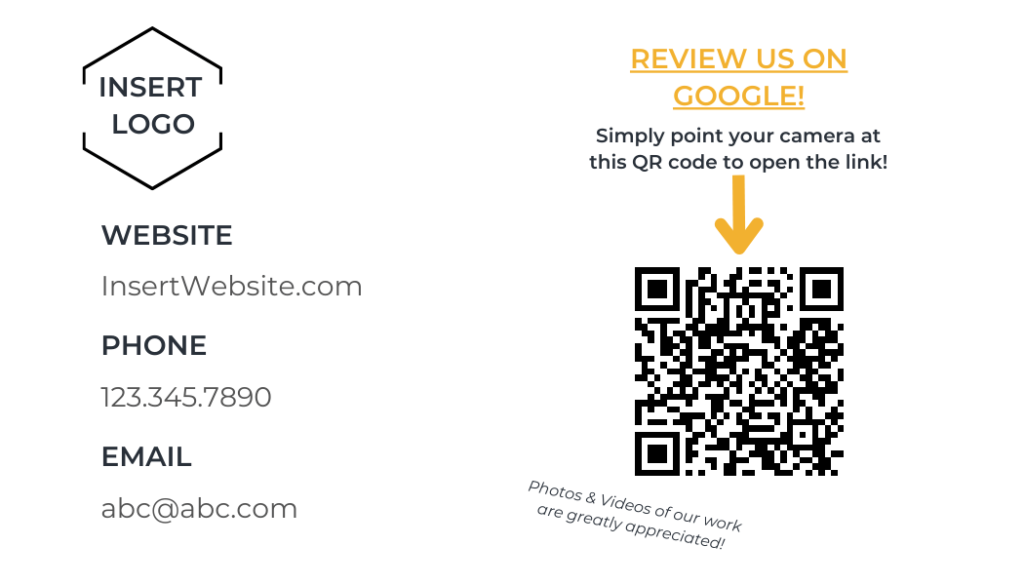
- Use this Business Card template with a QR code!
It’s no secret that a majority of people start their search with Google. Over the years they have been growing their local business presence and functionality to the point that specialists are dedicated to managing this work. Similar to SEO and PPC there are numerous ranking factors that come into play when competing in the local space. Darren Shaw and Whitespark cover this better than I ever could so I highly recommend checking this out if you work in local SEO. To me one of the biggest factors that you can actively control is reviews. It helps both with organic ranking in the local packs but also helps the user understand the quality of your work, product or service.
Businesses are always looking for ways to improve their Google reviews and there are tons of ways to do it. Some spammy, some costly, some just unnecessary. One of my favorite and most successful ways is to print business cards with a QR code that leads directly to your Google My Business page (or Yelp, Bing, whatever).
Taking Review QR Codes One Step Further With Dynamic Tracking
Once you start consistently using review QR cards, there’s a simple upgrade that can make them even more powerful: dynamic QR codes with tracking.
Most QR generators create static QR codes that send users directly to your Google review page. While this works perfectly fine, it also means you lose visibility into how the cards are actually performing. You have no way to see how many people scanned the code or when the scans happened.
With dynamic QR codes, the scan is first routed through a trackable link before directing the customer to your review page. This allows you to measure how many scans your cards receive and better understand how customers are engaging with them.
For businesses actively trying to grow their reviews, this insight can be extremely valuable. Instead of guessing whether your cards are working, you can clearly see how often they are being used.
Dynamic QR codes also open the door for more advanced review strategies. For example, businesses can create separate QR codes for different technicians, locations, or service teams. Over time, this helps identify which employees or locations are generating the most customer engagement and reviews.
Another useful feature is the ability to collect private feedback before sending customers to Google. Some businesses route customers through a quick satisfaction check before directing them to leave a public review. If a customer has a concern, they can submit feedback privately instead of immediately posting a negative review online.
If you’re running review campaigns across multiple locations or teams, dynamic QR codes can provide valuable insight while still keeping the process simple for customers.
Tools that specialize in Google review QR campaigns make it easy to implement this type of tracking while maintaining a seamless experience for users.
How To Setup A Review Business Card With A QR Code
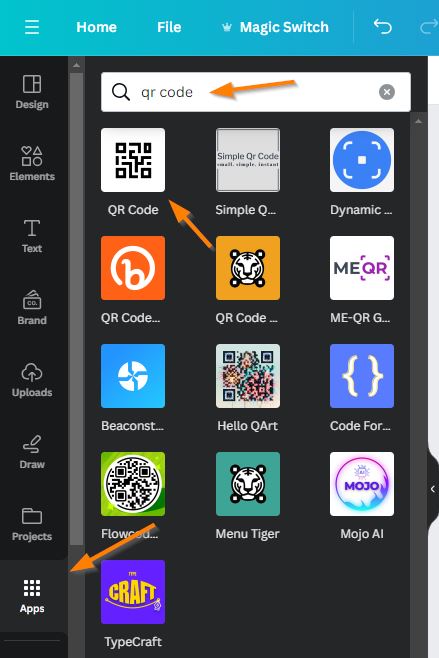
My tool of choice for all design aspects is typically Canva. There is so much functionality for a very reasonable price. One tool they have is a QR Code Generator. You can use this tool for free to generate a QR code for any link on the internet. After the pandemic, almost everyone should know how to use these with their smartphones.
Here is a simple business card template I put together that I have used with past clients. It has some quick business information, steps to scan the code and of course, the QR code that leads right to your desired location. I also added a call out for Photos & Videos because those can really help improve your local SEO visibility.
Visit the link above and customize it any way you want. I’m not the best with any kind of design so you likely can create something better. Just make sure you test the QR code to ensure it goes where you want it to. That’s the beauty of this process, you don’t need to rely on people finding their way to give you a review, you lead them right to it.

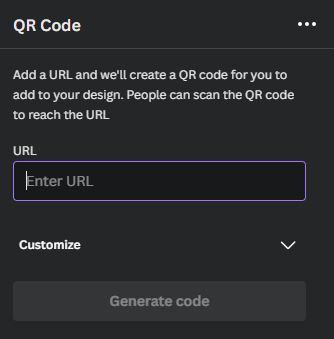
How To Print Business Cards For Reviews
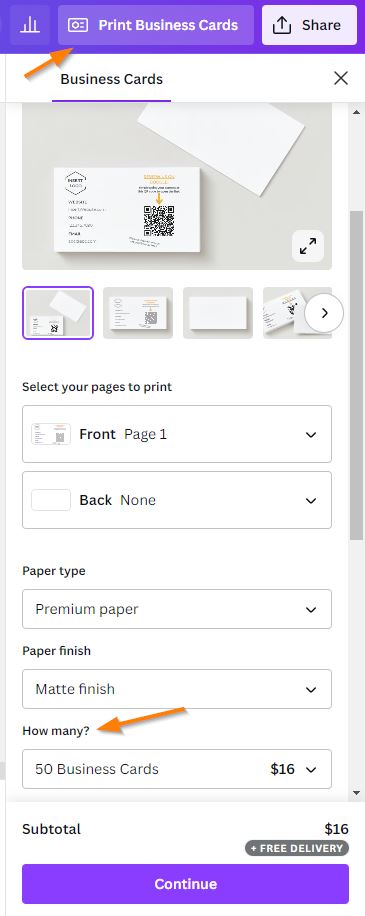
There are 2 ways to print out these cards after you have styled them the way you want:
- Canva allows you to order directly from the design (see below).
- As of this writing, it’s 50 for $16, 100 for $21.
- I have not used their printing so I cannot talk too much about it, but they are a very reputable company/tool so I wouldn’t stress too much!
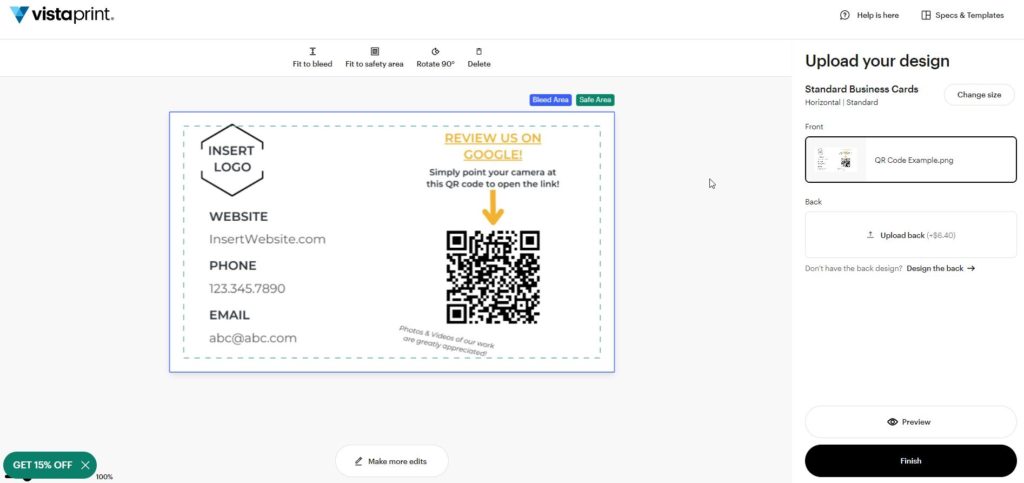
- VistaPrint allows you to upload the design to their Business Card Generator.
- Very simple, just download it from Canva and upload it to VistaPrint.
- As of this writing, it’s 50 for $10, 100 for $14.
- I have used them in the past and the quality has always been great!
How To Use These QR Codes To Increase Quality Reviews
After these cards are delivered you can now start to hand them out to your customers. The beauty of using these cards to generate reviews is that you can add a personal touch. When you have been working with a customer you can talk to them about the importance of these reviews and it will likely entice them to actually follow through as opposed to an automated email later down the line. I’ve also worked with companies that have internal competitions for who can get the most reviews. This encourages your workers to be advocates for your local SEO.
Another added benefit is that you control who these are given to. Have a great customer you know will sing your praises? Give them a card! On the flip side, maybe you are dealing with someone who doesn’t seem too happy. Don’t give them the keys to trash you! This has happened to past clients with automated outreach.
How I Help
I am a freelance digital marketing consultant who can assist you with Local SEO, Content Strategy, Analytics Reporting and more. See my portfolio for examples of past work. If you are in need of some digital marketing services please reach out to me through my contact form.